


Contents
- 1. The "True Smart" Choice: RayNeo X3 Pro
- 2. The "Big Screen" Choice: RayNeo Air 3s Pro
- 3. Fit Check: Which One Can You Actually Use?
- 4. Step-by-Step Setup Guide
- 5. Neutral Market Comparison
- 6. Realistic Limitations & Transparency
- 7. FAQ: Buying Advice
- 8. Next Steps: Make Your Choice
If you are searching for "what are the best smart glasses right now," you are likely facing a dilemma. The market has split into two very different directions, and there is no single winner for everyone. The answer depends entirely on whether you want a supercomputer or a super-monitor on your face.
Here is the quick verdict for 2026:
-
The Best True AI Glass (Overall Winner): RayNeo X3 Pro.
This is currently the only consumer-ready device that combines a standalone processor, a full-color 3D display, and Gemini-powered AI into a wireless frame. It is the best choice for travelers, tech professionals, and anyone needing real-time translation or navigation assistance. -
The Best for Media & Gaming (Runner Up): RayNeo Air 3s Pro.
Best for gamers and movie lovers who simply want a plug-and-play 201-inch virtual screen. It excels at immersion but requires a cable connection.
This comprehensive guide (20-minute read) breaks down the capabilities, real-world setup, and realistic limitations of the top contenders available today.
1. The "True Smart" Choice: RayNeo X3 Pro

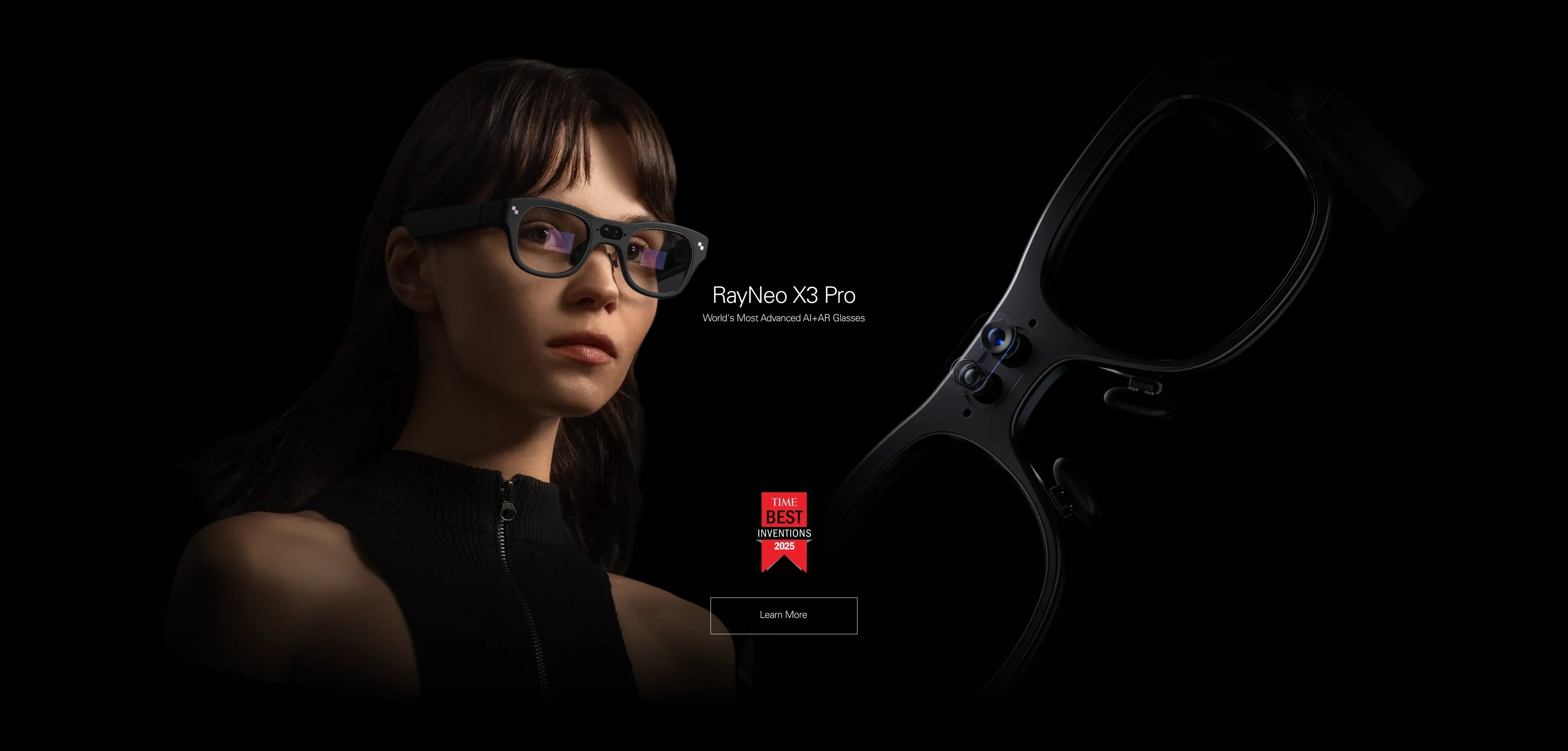
When people dream of "Smart Glasses"—Iron Man style HUDs, instant translation, no wires—they are dreaming of the RayNeo X3 Pro. Unlike most competitors that are just Bluetooth speakers with cameras (like Meta's offerings) or dumb screens (like XREAL Air), the X3 Pro is a standalone computer.
Why It Is The "Best Right Now"
In the current landscape, the X3 Pro stands alone because it bridges the gap between AI and AR. Most "AI glasses" lack a display, forcing you to listen to the AI's response. The X3 Pro features a Binocular Waveguide MicroLED Display.
-
You See, Don't Just Hear: When you ask for a translation, the English text floats in the air next to the foreign sign. When you ask for directions, 3D arrows are overlaid onto the actual road. This visual confirmation is crucial for trust and utility.
-
Wireless Freedom: It houses its own powerful Snapdragon processor, battery, and storage. You do not need to plug it into a phone to make it work. It is a liberating, "grab-and-go" device.
-
Gemini Intelligence: Deeply integrated with Google's Gemini large language model, it understands multimodal inputs. You can look at a flower and ask, "What species is this?" and it will analyze the video feed to give you an answer.
Best Use Scenarios
-
International Travel: Real-time visual translation of menus, train schedules, and street signs. It removes the anxiety of being in a foreign country.
-
Urban Navigation: Heads-up cycling or walking directions. You keep your eyes on the traffic, not down at a phone screen.
-
Executive Assistance: During a meeting, it can provide discreet notifications or key talking points in your peripheral vision without breaking eye contact.
2. The "Big Screen" Choice: RayNeo Air 3s Pro
If your definition of "Best" involves lying in bed and playing Black Myth: Wukong on a massive theater screen, then "AI Glasses" aren't for you. You need Display Glasses (AR).
The RayNeo Air 3s Pro is the current flagship in this category, refining the concept of the "portable monitor" to near perfection.
Why It Is A Top Contender
These glasses focus on one thing: Visual Immersion. They use Sony Micro-OLED panels to create a virtual image equivalent to a 201-inch screen viewed from 6 meters away.
-
Image Quality First: With 1080p resolution per eye and infinite contrast (thanks to OLED), colors pop and blacks are truly black. It supports 120Hz refresh rates, making it silky smooth for gaming.
-
Plug-and-Play Simplicity: There is no operating system to manage, no Wi-Fi to configure, and no battery to charge. It draws power directly from your phone or console via USB-C. It just works.
-
Privacy: On a plane or train, only you can see the screen. It is the ultimate privacy filter for sensitive documents or watching movies.
Important Distinction: While the Air 3s Pro offers superior video quality for movies, it is "tethered" via a cable. It is not a standalone computer like the X3 Pro.
3. Fit Check: Which One Can You Actually Use?
Before you click "Buy," you must confirm your lifestyle and gear compatibility. The "Best" glasses are useless if they don't fit your ecosystem. Hardware incompatibility is the number one reason for user frustration in this category.
Check A: Do you want to ditch your phone?
-
Yes (Choose X3 Pro): The X3 Pro works independently. While it pairs with a smartphone app for initial setup and data tethering, you can physically leave your phone in your bag and still use navigation, translation, photo taking, and AI chat features. It connects via Bluetooth and Wi-Fi.
-
No (Choose Air 3s Pro): The Air Series requires a connected host device at all times. Your phone, console, or laptop acts as the brain; the glasses are strictly the display.
Check B: Hardware Compatibility (Critical for Air 3s Pro)
If you are leaning towards the Air 3s Pro for gaming or media, you must verify your device's ports. The glasses use USB-C DisplayPort Alt Mode.
4. Step-by-Step Setup Guide

To ensure you get the "Best" experience, proper setup is non-negotiable. Here is the workflow for both devices.
Setting Up RayNeo X3 Pro (The AI Route)
-
Power On: Press and hold the power button on the temple. You will see the waveguide display light up with the RayNeo logo.
-
App Pairing: Download the "RayNeo App" on your iOS or Android device. Enable Bluetooth and follow the pairing prompt. This creates the data bridge.
-
Network: Connect the glasses to your Wi-Fi network (or phone hotspot) via the app settings. Note: Real-time AI translation requires an active internet connection to process data in the cloud.
-
Calibration: The glasses will guide you through an eye-tracking and display alignment calibration. Do not skip this; it ensures the AR overlays align perfectly with the real world.
Setting Up RayNeo Air 3s Pro (The Display Route)
-
Cable Check: Use the provided directional USB-C cable. Locate the Angled (L-shaped) end. Plug this into the right temple of the glasses. This design routes the cable behind your ear.
-
Connection: Plug the straight end into your host device (e.g., iPhone 15 or JoyDock).
-
Audio Output: Put the glasses on. If sound is coming from your phone, go to Control Center -> Audio -> Select "RayNeo Air".
-
Nose Pad Swap (Crucial): If the top of the screen is cut off, the glasses are sitting too high. Swap to the Small nose pad. If the bottom edges are blurry, they are too low; swap to the Large pad. Proper physical alignment solves 90% of image clarity issues.
5. Neutral Market Comparison
To be transparent, RayNeo isn't the only player. Here is how the X3 Pro compares to the other "Best" option currently making headlines: The Meta Ray-Ban.
6. Realistic Limitations & Transparency
We want you to be a happy long-term user, which means understanding the physical limits of current technology.
Battery Life (X3 Pro)
-
The Reality: It is a computer on your face. While standby time is excellent (all day), heavy active use—such as continuous real-time translation or 4K video recording—will drain the battery in 3–4 hours.
-
The Fix: Use it for "micro-interactions" (checking info, short convos) rather than recording your entire day. It charges quickly via magnetic pogo pins.
Display Physics (Air 3s Pro)
-
Edge Blur: Users sometimes notice the extreme corners of the virtual screen are softer than the center. This is a physics limitation of "Birdbath" optics used to achieve the massive 201-inch FOV. It is normal.
-
Daylight Use: The Air 3s Pro lenses are semi-transparent. In bright sunlight, the image will look washed out. You must use the included magnetic lens shade (blackout cover) to get the best contrast outdoors.
Thermal Management
-
Heat: Both devices generate heat. The X3 Pro processes AI on-device; the Air 3s Pro handles high-brightness OLEDs. You may feel warmth on the temples after 30 minutes of intense use. This is normal heat dissipation. We recommend taking a 5-minute break every hour for comfort.
7. FAQ: Buying Advice
Q: Can I replace my prescription glasses with these?
A: Not for 24/7 wear. While lightweight, they are heavier than standard frames. However, for using the device, you absolutely can use prescription inserts. Both the X3 Pro and Air 3s Pro support magnetic lenses that snap onto the inside. This is far more comfortable than wearing them over your daily glasses. Check Prescription Options.
Q: Does the X3 Pro work without Wi-Fi?
A: Some features work offline (like basic UI navigation, taking photos/videos, and music). However, advanced AI features—like Gemini interactions and real-time translation—require an internet connection (via your phone's hotspot or Wi-Fi) to process the large language models in the cloud.
Q: Which one is better for lying in bed?
A: Definitely the RayNeo Air 3s Pro. Its form factor is slimmer against the back of the head (temples are flatter), and the OLED screen is designed for watching movies in the dark. The X3 Pro is designed for upright, active use.
8. Next Steps: Make Your Choice
Don't overthink specs. Choose based on the one feature you can't live without.
Action 1: Choose "The Future" (AI & Travel)
If you want translation and navigation without a phone, get the X3 Pro.
Action 2: Choose "The Cinema" (Gaming & Media)
If you want a giant screen for your Steam Deck or iPhone 15, get the Air 3s Pro.
Action 3: Check Your Phone
If buying the Air Series, confirm your phone has DP Alt Mode first.
Share:
Are There Smart Glasses That Support Prescription Lenses? The 2026 Vision Guide
Are There Smart Glasses With a Display That Support Prescription Lenses? (2026 Guide)